vibes.diy Live
home / music-studio
Dr. Deas Music Suite

Three tools.
Two generations.
Build yours.

A drum machine, a pattern library, and a chord synthesizer — deployed with npx vibes-diy. Clone any of them, or build fresh from the specs below.

Originals
3
Remixes
3
Author
og
Audio
Web API
01 — Original run

The Originals

Three instruments deployed from short prompts. Shipped, used, iterated.

Original 01 / 03
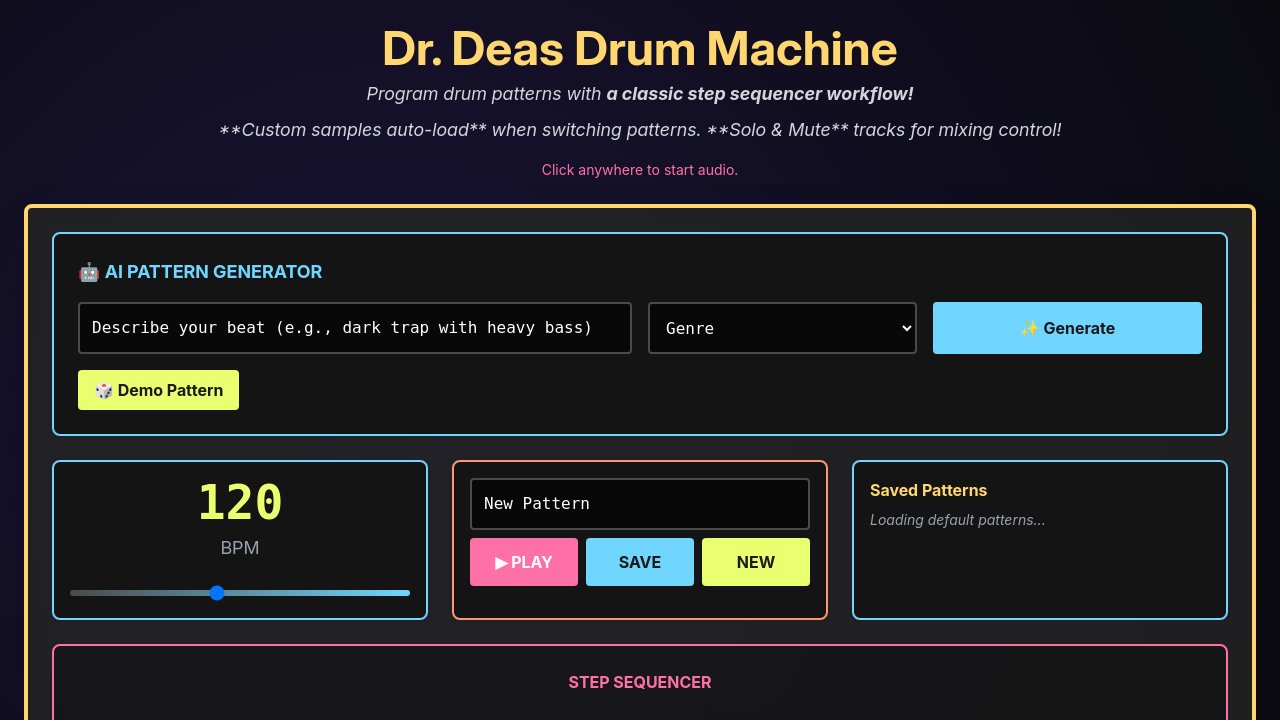
Dr. Deas Drum Machine

Dr. Deas Drum Machine

Style-generated patterns. Custom samples. Solo and mute.

Describe your beat — dark trap, four-on-the-floor, reggaeton break — and all 8 tracks fill in at once. Adjust BPM, save patterns by name, solo and mute for mixing.

// build fresh →
Step sequencer drum machine, 8 tracks, BPM control. AI beat generator: describe style and genre, fills all tracks. Solo, mute, save patterns by name.
Original 02 / 03
Dr. Deas Pattern Saver

Dr. Deas Pattern Saver

Instrument-first workflow. LEVEL, TUNE, DECAY per track.

Select a drum voice, program 16 steps, dial in the feel. LEVEL, TUNE, and DECAY controls per instrument. Pattern generator and demo patterns included.

// build fresh →
Drum machine with instrument-first 16-step sequencer. Per-track LEVEL, TUNE, and DECAY controls. AI generate button and demo patterns. Save patterns by name.
Original 03 / 03
Dr. Deas Chord Synthesizer

Dr. Deas Chord Synthesizer

MIDI import, AI progressions, auto-rhythm.

Drag in a .mid file and hear it as chord progressions. Or describe your mood and get a progression with rhythm patterns generated automatically.

// build fresh →
Chord synthesizer with AI progression generator and MIDI file import. Auto-detect chords, generate rhythm patterns. Classic analog synthesis sounds.
2026 Remix
Same tools, rebuilt by hand: lookahead Web Audio scheduler, DynamicsCompressor + tube warmth WaveShaper on the master bus, richer controls, zero regressions. Expand any spec below to build your own version.
02 — Hand-tuned

2026 Remix

Rebuilt from the OG source: polish, bug fixes, showcase features. Expand any spec to build your own version.

2026 Remix 01 / 03
Drum Studio

Drum Studio

Pattern chains. Tube warmth. Dynamics compression.

Lookahead scheduler, DynamicsCompressor + WaveShaper tube warmth on the master bus. 16-step grid grouped by beat, per-track volume and tune.

// full build spec →
Show spec
Build a 16-step drum sequencer with 8 tracks: Kick, Snare,
Open Hat, Closed Hat, Hand Clap, Crash, Cowbell, Clave.

Audio engine — Web Audio API, all sounds procedural:
  Kick: sine oscillator, exponential frequency sweep 200Hz to 40Hz
    in 80ms. Amplitude envelope: attack 0ms, decay 300ms.
  Snare: filtered white noise (bandpass 180Hz to 2kHz) mixed 60/40
    with a 200Hz sine, 150ms decay.
  Closed hat: white noise through highpass at 8kHz, 60ms decay.
  Open hat: same noise chain, 400ms decay.
  Clap: 4 noise bursts 8ms apart, shared 200ms tail.
  Crash: bandpass noise, 800ms decay.
  Cowbell: two square waves at 540Hz and 800Hz, 8ms attack, 600ms decay.
  Clave: sharp click, 40ms total.

Timing: lookahead scheduler. Schedule notes 100ms ahead, tick every
25ms via a scheduling interval. Never use setInterval or setTimeout
to fire audio events directly — only for the scheduling loop itself.

Step grid: 16 toggles per track, arranged as 4 groups of 4, with a
thin visual rule separating each group. Active steps use the accent
color. Playhead highlights the current step in a distinct pulse color.

Track row controls:
  Name label (click to select that track). Solo [S] and mute [M]
  buttons. Volume slider 0 to 100. Tune slider -12 to +12 semitones,
  default 0. Selected track row is highlighted with a subtle tint.

Transport: BPM slider 60 to 200, default 120, with numeric readout.
Play / Stop button. Clear active track only. Clear All with a
confirmation dialog before wiping.

Pattern management: Name input field. Save writes the complete state
(all 8 tracks of steps, BPM, per-track volume and tune) to localStorage.
Saved patterns panel: list of names, click any to load. New button
creates a blank pattern. Patterns auto-save on every change with a
"saved" indicator that fades out after 1 second.

AI pattern generator: Text description input (e.g. "dark trap, heavy
bass") plus genre dropdown (House, Trap, Drumline, Reggaeton, Jazz,
Metal). Generate fills all 8 track grids. Show a loading spinner in
the button during generation.

Master effects chain, applied after all tracks mix:
  1. DynamicsCompressorNode with four labeled knobs:
       Threshold: -60 to 0 dB, default -24 dB
       Ratio: 1:1 to 20:1, default 4:1
       Attack: 0 to 200ms, default 3ms
       Release: 50ms to 2000ms, default 250ms
  2. WaveShaperNode with a tanh soft-clip curve. A pre-gain stage
     (0.5x to 3x) feeds into it. Expose as a single Tube Warmth knob
     (0 to 100) that maps linearly to pre-gain. Show the current
     pre-gain value as a numeric label beside the knob.
  3. Master volume GainNode, exposed as a final volume slider.

All knob and slider values shown as numeric labels.
Group the three master chain controls in a panel labeled "Master Bus".

Persist the full session to localStorage on every change.
Restore the last session on mount. Show a brief "session restored"
toast on successful restore.
2026 Remix 02 / 03
Pattern Vault

Pattern Vault

Tags, shareable URLs, two-panel layout.

Your patterns, organized: tag them, search them, share them as encoded URLs. Left panel browser, right panel sequencer, full library in localStorage.

// full build spec →
Show spec
Build a drum pattern library with a two-panel layout:
300px left panel (pattern browser) and flex-1 right panel (live sequencer).

Right panel — step sequencer:
  8 tracks: Kick, Snare, Open Hat, Closed Hat, Hand Clap, Crash,
  Cowbell, Clave. 16 steps each.
  Web Audio API procedural synthesis: kick = exponential freq-sweep
  sine; snare = noise burst + short sine; hats = filtered noise at
  different decay lengths; clap = burst of noise pulses; cowbell =
  two square waves mixed.
  Per-track controls: volume slider 0 to 100, mute button.
  BPM slider 60 to 200. Play / Stop / New / Save buttons.
  Playhead animates during playback. Steps group visually into 4 beats.

Left panel — pattern browser, scrollable:
  Each saved pattern as a card: name, tag chips, BPM label, and a
  mini 8x16 dot-grid preview (read-only, each step a 4x4px dot).
  Clicking a card loads it into the right panel sequencer.
  Active card highlighted. Sorted by most recently saved first.

Tags: free-text tags on each pattern. On Save, show a modal: name
input and tags input (type and press Enter to add each tag, click chip
to remove). Tag filter row above the pattern list — clicking a tag
filters to patterns with that tag only. A "Clear filter" button resets.
Search input filters by name substring in real time.
Tags are case-insensitive and de-duplicated.

Pattern URL sharing: encode the full pattern state (8 tracks of 16
booleans, BPM, per-track volumes, pattern name) as base64 JSON in
window.location.hash. A Share button copies the current URL to clipboard
and briefly shows "Copied!" beside the button.
On mount, if a hash is present decode it and load the pattern directly
(skip localStorage restore). Handle malformed hash with an error toast
and load empty state instead.

Import / Export:
  Export: download the full library as a JSON file. Each entry has
    id (uuid), name, tags array, bpm, tracks (object mapping track
    name to 16 booleans), volumes object, createdAt ISO timestamp.
  Import: file picker for .json, parse and merge into localStorage.
    On name collision, append " (imported)" suffix.
    Show a count toast: "Imported 5 patterns."

UX rules:
  New: clears sequencer state only, does not affect saved patterns.
  Save with an existing name: confirm overwrite with an inline prompt.
  Delete: per-card icon button with inline "Sure?" confirm (no modal).
  Auto-save draft to a separate localStorage key every 10 seconds
  so no changes are lost between explicit saves.

Mobile (viewport narrower than 768px): single column; a toggle button
switches between Browse and Play panels. Animate the panel transition
with a 200ms slide.
2026 Remix 03 / 03
Chord Studio

Chord Studio

Arpeggiator, voicings, piano visual, tube warmth.

Chord synth rebuilt: close/open/drop-2 voicings, rate-gated arpeggiator, two-octave keyboard visual, tube warmth + reverb master chain.

// full build spec →
Show spec
Build a chord synthesizer in three sections: chord selector (top),
keyboard visual (middle), controls and playback (bottom).

Chord selector:
  Root note picker: C through B, 12 chromatic buttons in a row.
  Scale dropdown: Major, Natural Minor, Harmonic Minor, Dorian,
  Phrygian, Mixolydian, Pentatonic Major, Pentatonic Minor, Blues.
  Diatonic chord grid: all chords built on each scale degree, labeled
  with Roman numerals (I, ii, iii, IV, V, vi, vii) and chord names
  (e.g. Cmaj, Dm, G7). Clicking a chord plays it. Octave selector 3 to 6.

Voicing selector (global, applies to every chord):
  Close: all notes stacked within one octave in thirds.
  Open: notes spread across two octaves — root, fifth up one octave,
    third up two octaves.
  Drop-2: take close voicing, lower the second-highest note one octave.
  Voicing changes the exact MIDI note numbers triggered.

Keyboard visual: two-octave piano starting at the root note.
  When a chord plays, highlight all active notes in the accent color.
  In Arpeggio mode, highlight each individual note as it fires.
  Non-diatonic keys for the current scale are visually dimmed (not hidden).

Two playback modes (radio toggle):
  Chord mode: all notes trigger simultaneously on click. Sustained
    until a new chord is clicked or Stop is pressed.
  Arpeggio mode: notes fire one at a time in a repeating loop.
    Controls: Rate (1/4, 1/8, or 1/16 note at current BPM),
    Direction (Up, Down, Up-Down, Random), Gate (20% to 100% — ratio
    of note-on time to step duration). BPM input 60 to 200.
    Each arpeggio step re-triggers the amplitude envelope:
    attack 10ms, release equals gate multiplied by step duration minus 10ms.
    Stop ends the loop cleanly without cutting mid-note.

Synthesis per note:
  OscillatorNode with waveform selector: sine, triangle, sawtooth, square.
  Each note through a GainNode amplitude envelope: attack 10ms, release
  400ms. All note gains mix to a shared master bus.

Master chain:
  1. DynamicsCompressorNode: threshold -20dB, ratio 6:1, attack 5ms,
     release 100ms. Hardcoded — not exposed as user controls.
  2. WaveShaperNode: tanh soft-clip with pre-gain stage. Tube Warmth
     knob 0 to 100 controls pre-gain 0.5x to 3x. Show numeric value.
  3. ConvolverNode reverb: synthetic impulse response (exponential white
     noise decay, 1.5s length). Reverb Mix knob 0 to 100 controls
     wet/dry ratio via two parallel GainNodes.

AI chord progression generator:
  Text input: describe mood or genre.
  Length selector: 4 chords or 8 chords.
  Generate returns a sequence of diatonic chord names from the
  current root and scale. Display as a row of numbered step buttons.
  Play Sequence: plays each chord in order, one chord per bar at
  current BPM. Highlight the active step. Works in both Chord and
  Arpeggio modes. Stop halts cleanly.

MIDI file import:
  Drag-drop zone for .mid files. Parse note events, group notes
  within a 50ms window into a chord, identify chord names. Display
  the detected sequence in the same step-row UI. Play button runs it.

Saved progressions:
  Name input plus Save stores the current sequence to localStorage.
  Load dropdown lists all saved progressions. Delete button per entry.
// start building

Build your own instrument.

One command, one prompt. Vibes DIY deploys a live React app in under a minute. No bundler, no config, no account required.